How bimpsin texts
Last updated November 5, 2026
bimpsin sends two kinds of text messages. Both are one-to-one and about something you asked for or a plan you were personally invited to. We never send marketing or promotional texts.
Sign-in codes
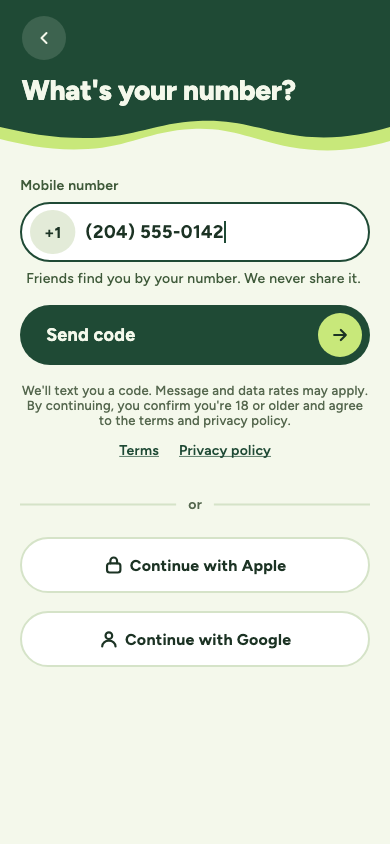
When you type your own mobile number into the bimpsin app and tap Send code, we text a one-time code to that number. The screen says we'll text you a code and that message and data rates may apply.
Plan invitations for friends without the app
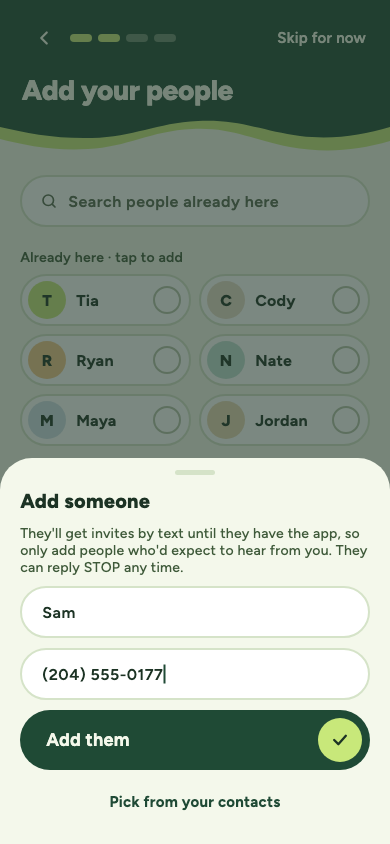
A bimpsin user can add a friend they know by name and mobile number, so they can invite that friend to plans before the friend has the app. The app tells them the friend will get invites by text, to only add people who'd expect to hear from them, and that the friend can reply STOP at any time.
Adding someone doesn't send anything. The friend gets a text only when that user invites them to a specific plan. Every invitation names the person inviting them, says it was sent through bimpsin, and ends with "Reply STOP to opt out." After that, texts are only about that plan: the time once it's set, up to two reminders if they haven't answered, and changes or cancellations.
Message frequency
Frequency varies with the plans you're invited to. Invitations are limited to 6 texts per number per week, and invitations for later dates aren't sent between 9 pm and 9 am. Updates about a plan you said yes to, like its final time or a cancellation, may go out on top of that.
Stopping texts
- Reply STOP to any bimpsin text to stop all texts from bimpsin. We'll confirm, and send nothing else.
- Reply START to get texts again.
- Reply HELP for help, or email privacy@bimpsin.com.
- Every invitation page has a Stop texts link, where you can stop invites from one person or every text from bimpsin.
The fine print
Message and data rates may apply. Carriers aren't liable for delayed or undelivered messages. We don't sell or share phone numbers, or consent to receive texts, with anyone for their marketing. See our privacy policy and terms of service.